Tampilkan postingan dengan label Design. Tampilkan semua postingan

Adobe Photoshop Unmasked: The Art and Science of Selections, Layers, and Paths


Book DescriptionAs the feature list of Adobe Photoshop continues to grow, even users with years of experience can feel overwhelmed by the many tools and methods for selecting or isolating parts of an image. Layers, channels, paths, clipping masks, layer masks, vector masks, the Pen tool, Magic Wand, and so on — all let users work on specific regions of an image, but in fundamentally different ways. Making clean, efficient selections are essential skills for any Photoshop user, whether a graphic designer, professional photographer,or hobbyist.Graphic designer, teacher, and Photoshop expert Nigel French saves you hours of frustration by illuminating the best selection tools and techniques for specific tasks, and the most flexible approaches to correcting and editing images in Photoshop. Using step-by-step examples, this book clarifies often-misunderstood selection methods, shows which masks best select a range of tone or color, and demonstrates how the right tools and techniques can help transform even the most mediocre picture into a polished image, saving you hours of time.• Learn the fundamentals of making selections, and when to choose which method• Blend images and replace backgrounds using layer, vector, and channel masks• Correct color and exposure using adjustment layers• Make next-to-impossible hair selections with channel masks• Create a non-destructive workflow, giving you total creative freedom

The MEL Companion: Maya Scripting for 3D Artists (Graphics Series)


The Maya Embedded Language, or MEL, is the very foundation of the Maya application: it’s what makes it so powerful. And, if you know MEL, you can make Maya work more efficiently for your own projects. Whether customizing the workspace, modifying the tools that already exist, or creating new tools, an artist versed in MEL is ready to exploit the true power of Maya. The problem is that MEL can be very intimidating to artists and other non-programmers. To an artist, MEL represents a whole other world filled with words like variable, conditional statements, and vector cross-product. Like any other programming language, MEL has its own vocabulary and rules of grammar. To master it, you simply need to learn the rules: you don’t have to become a programmer. The MEL Companion helps artists do this. In the first part of the book, you’ll learn about the syntax, vocabulary, and structure of MEL - its grammar. You’ll learn some basic math concepts, such as types of numbers and simple math equations, and at the end of part one you’ll explore concepts for building and constructing programs. The second part covers the construction of scripts that detail some of the ways you can use MEL. You’ll learn about expressions, primitive objects, lighting and rendering, tool creation, interface customization, and reading and writing files in and out of Maya. The MEL Companion was written by an artist for artists. To get the most out of this book, you should have a fundamental knowledge of working in 3D and the Maya program. In addition, although you might not have an extensive knowledge and understanding of mathematics, you should have some willingness to learn the basics of working with numbers. Other than that, everything else is explained in language that is hopefully as clear as it is entertaining
download

Maya Character Creation: Modeling and Animation Controls, First Edition


A unique, in-depth approach to creating realistic characters in Maya. Maya Character Creation: Modeling and Animation Controls’ author, Chris Maraffi, has expertise in the field and in the classroom that translates to the knowledge and solid teaching skills needed to make this book a “must-have”!

The current trend in computer graphics is greater organic realism. Many of thetop-grossing movies today, such as Spiderman, Lord of the Rings, Jurassic Park 3 ,and Star Wars Episode 2, all feature realistic 3D characters. There is a majorneed in the 3D community for educational material that demonstrates detailedtechniques for achieving this organic reality. Maya is one of the main packagesused on such cutting-edge films, and has an established toolset for creatingbelievable 3D characters. Maya Character Creation: Modeling and Animation Controls is designed to take you through the process of designing, modeling, and setting up animation controls for complex 3D characters. The concepts, techniques, and Maya tools used foreach step in the process are presented in each chapter, followed by manyhands-on exercises. NURBS, polygon, and subdivision surface modelingtechniques are shown for creating the character’s skin, and skeleton-basedanimation controls are covered in detail. You will learn how a character’sskin should deform when the skeletal joints and muscles move. AdvancedMEL scripted animation controls are also covered extensively.

download


LightWave v9 Texturing


LightWave v9 Texturing takes you behind the fine art of texturing and surfacing interesting and detailed textures for your 3D objects using LightWave 3D.

Texturing and prepping your objects for texturing is a task that many artists find intimidating and/or confusing. LightWave v9 Texturing breaks down this process and makes it easier to understand by guiding you through LightWave’s powerful surfacing toolset, tutorials, and exercises. LightWave v9 now offers a nodal shading system, which is the standard tool in the visual effects industry for the creation of surfaces. This book will show you how easy, yet extremely powerful and flexible this new system is, allowing you to dive in and create great surfaces immediately.

download


3D Max tutorial for creating Ferrari F430


3D Max tutorial for creating Ferrari F430
Tutorials3D: Ferrari F430 | 67 Mb


Modeling
Lesson 1 Preliminaries
• Placing the reference images using the 3dsmax
Lesson 2 Body (I)
• Basic shapes using splines
• Debug splines
Lesson 3 Body (II)
• Surface Modifier
Move the plsines at the ·D space
Lesson 4 Body (III)
• Editable Polygon conversion
• Symetry modifier
Lesson 5 Body (IV)
• Polygonal modeling. Segmentations and cuts. Working with vertices.
• Objects poperties
Lesson 6 Body (V)
• Mesh smooth modifier
• Polygonal modeling: frontal area details (I)
Lesson 7 Body (VI)
• Polygonal modeling: frontal area details (II)
Lesson 8 Body (VII)
• Polygonal modeling: fontal borders (I)
Lesson 9 Body (VIII)
• Polygonal modeling: fontal borders (II)
Lesson 10 Body (IX)
• Polygonal modeling: fontal borders (III)
Lesson 11 Body (X)
• Elements. Separate the frontal from the main mesh.
Lesson 12 Body (XI)
• Working with Editable Polygon elements
Lesson 13 Body (XII)
• Polygonal modeling: hood and lateral
Lesson 14 Body (XIII)
• Elements. Detaching the hood from the main mesh.
Lesson 15 Body (XIV)
• Elements. Detaching the ópticas.
• Polygonal modeling: Debuging the car’s lateral area.
Lesson 16 Body (XV)
• Modeling the cover.
Lesson 17 Body (XVI)
• Polygonal modeling: adding the lateral details. Air Entrada
Lesson 18 Body (XVII)
• Polygonal modeling: Debugin the air entrada.
Lesson 19 Body (XVIII)
• Detaching the door.
Lesson 20 Body (XIX)
• Modeling the door.
Lesson 21 Body (XX)
• Lateral elements borders.
Lesson 22 Body (XXI)
• Working with vertices: general adjustment to the references.
• Detaching the back window.
Lesson 23 Body (XXII)
• Modeling the top area air entrada.
Lesson 24 Body (XXIII)
• Debugin the top area air entrada.
Lesson 25 Body (XXIV)
• Polygonal modeling: create the back area polygons.
Lesson 26 Body (XXV)
• Segmentatios and cuts. Debug the back area.
Lesson 27 Body (XXVI)
• Modeling the back area (I)
Lesson 28 Body (XXVII)
• Modeling the back area (II)
Lesson 29 Body (XXVIII)
• Modeling the back area (III)
Lesson 30 Body (XXIX)
• Modeling the back area (IV)
Lesson 31 Body (XXX)
• Modeling the back area (V). Boolean operations.
Lesson 32 Body (XXXI)
• Detach the back area in a new element.
Lesson 33 Body (XXXII)
• ópticas holes borders.
Lesson 34 Ruedas (I)
• Modeling the back-side mirror (I)
Lesson 35 Ruedas (II)
• Modeling the back-side mirror (II)
Lesson 36 Accessories (III)
• Modeling the back-side mirror (III)
• Back side Ópticas
Lesson 37 Accessories (IV)
• Box modeling: the windows join.
Lesson 38 Accessories (V)
• Lateral windows.
Lesson 39 Accessories (VI)
• Back glass.
Lesson 40 Accessories (VII)
• Parabrisas
• Composition object FusForma (Shape Merge)
Lesson 41 Accessories (VIII)
• Back Difusor (I)
Lesson 42 Accessories (IX)
• Back Difusor (II)
Lesson 43 Accessories (X)
• Escape tubes modeling.
Lesson 44 Accessories (XI)
• Frontal area accessories.
Lesson 45 Accessories (XII)
• Ópticas
Lesson 46 Accessories (XIII)
• Frontal Ópticas
Lesson 47 Ruedas (I)
• Modeling the rim (I)
Lesson 48 Ruedas (II)
• Modeling the rim (II)
Lesson 49 Ruedas (III)
• Modeling the tire
Lesson 50 Motor
• Low Poly: the motor
Lesson 51 Inside (I)
• Back plane background
Lesson 52 Inside (II)
• Dash panel basic modeling.
Lesson 53 Inside (II)
• Dash panel details.
Lesson 54 Inside (III)
• Detair: air conditioner holes.
Lesson 55 Inside (IV)
• Modeling the central console.
Lesson 56 Inside (V)
• Modeling the volante
Lesson 57 Inside (VI)
• Modeling the door’s internal panels.
Lesson 58 Inside (VII)
• The competition bacquet seats.
Lesson 59 Inside (IX)
• Fianl details. Logos and lateral lights.

download


Photoshop CS3 for Screen Printers


download

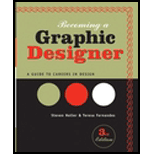
Becoming a Graphic Designer


Becoming a Graphic Designer provides a comprehensive survey of the graphic design market, including complete coverage of print and electronic media and the evolving digital design disciplines that offer today’s most sought-after jobs. Featuring 65 interviews with today’s leading designers, this visual guide has more than 600 illustrations and covers everything from education and training, design specialties, and work settings to preparing an effective portfolio and finding a job. The book offers profiles of major industries and key design disciplines, including all-new coverage of careers in exhibition design and illustration
download

Final Cut Studio On the Spot, Third Edition


Packed with more than 500 techniques, this book delivers what you need to knowon the spot. It is suited to editors of all experience levels, whether you are:

* Migrating from another NLE
* Upgrading to Final Cut Studio 2
* Seeking a handy reference to raise your proficiency

No need to wade through tomes of documentation. Final Cut Studio On the Spot presents immediate solutions in an accessible format. Step-by-step instruction by Apple Certified Pros shows you how to:
* Optimize system performance
* Create impressive titles with Generators, Motion, LiveType, and Photoshop
* Build Commercial-quality transitions
* Work quickly with buttons and keyboard shortcuts
* Color correct to save vital shots, and keep them broadcast legal
* Fix and mix for professional-quality audio
* Use the compositing tools of master editors
* Design and import graphics seamlessly
* Integrate with other applications including Motion, Soundtrack Pro and Color
* Troubleshoot and recover files
* Manage media and backup strategies
* Export and publish finished projects to tape, DVD, or the Web

download

The Adobe InCopy CS2 Book


If you’ve ever worked in a fast-paced editorial environment, you know just how frustrating it can be to wait as each member of the team–from writer, to editor, to artist–makes changes to his or her piece of the layout puzzle. With InCopy, you don’t have to! The Adobe InCopy Book shows editorial teams how to take control of the copy-fitting process as editors, designers, and writers work simultaneously on the same InDesign CS document. The guide begins with the basics, explaining what InCopy is and how it integrates with InDesign before moving on to describe the interface. The second section provides a feature-by-feature breakdown of how the program works, using simple step-by-step instructions and plenty of screen shots to ease the way. The remainder of the book is devoted to real-world workflows: one in which design trumps copy (that is, the design is created first), one in which copy trumps design (copy is created first), and one in which copy and design are of equal importance.

Ecohouse: A Design Guide


-Learn about the key issues of form and construction in Eco house design around the world;-Gain an understanding of building materials and their energy and environmental impacts;- now essential for both student and practitionerTheory is shown in practice with 21 case-studies from around the world Ecohouse is an exciting and timely text that tells you how to design low energy, environmentally friendly buildings today. It also provides the foundations for building design in a warming world, and stepping stones towards the zero-carbon emission buildings of tomorrow

Camtasia Studio 5: The Definitive Guide


Camtasia Studio 5 is the latest version of TechSmith's industry-leading screen video recording and editing tool. Camtasia Studio 5: The Definitive Guide leads the user through the entire process of creating top-notch software tutorials, marketing spots, and demonstrations. It starts right at the beginning of the process, with developing goals and figuring out the core audience, and proceeds to storyboarding, on through recording, editing, and production. Camtasia Studio 5 is appropriate for users at all levels.

Photoshop for Comics Master Course


This CD walks you through every aspect of Photoshop that you'll need to know to create and color your very own comics! Learn all the tricks of the trade including: Cuts, Color Holds, Color Theory, Trapping, Gamut, RGB vs CMYK and much more! Even learn to create zip-a-tone, word balloons and a whole range of awesome special effects! 150 pages of instruction, with easy to follow screen shots and diagrams! This is a must have item if you're interested in creating your own Photoshop masterpieces! CD also includes sample images for you to color, custom brushes and more! Also includes online updates and bonus chapters!